After a base portfolio is created, users can edit any section freely. When unsure about specific content, they can select it and ask Shipi for help. Shipi suggests an improved version, explains why it works, and allows users to apply the change instantly helping reduce doubt while keeping users in control of their voice.
During user testing, Smart Editing emerged as the strongest and most trusted feature, as users valued seeing improvements applied immediately with clear reasoning.
Feature 1
SMART EDITING
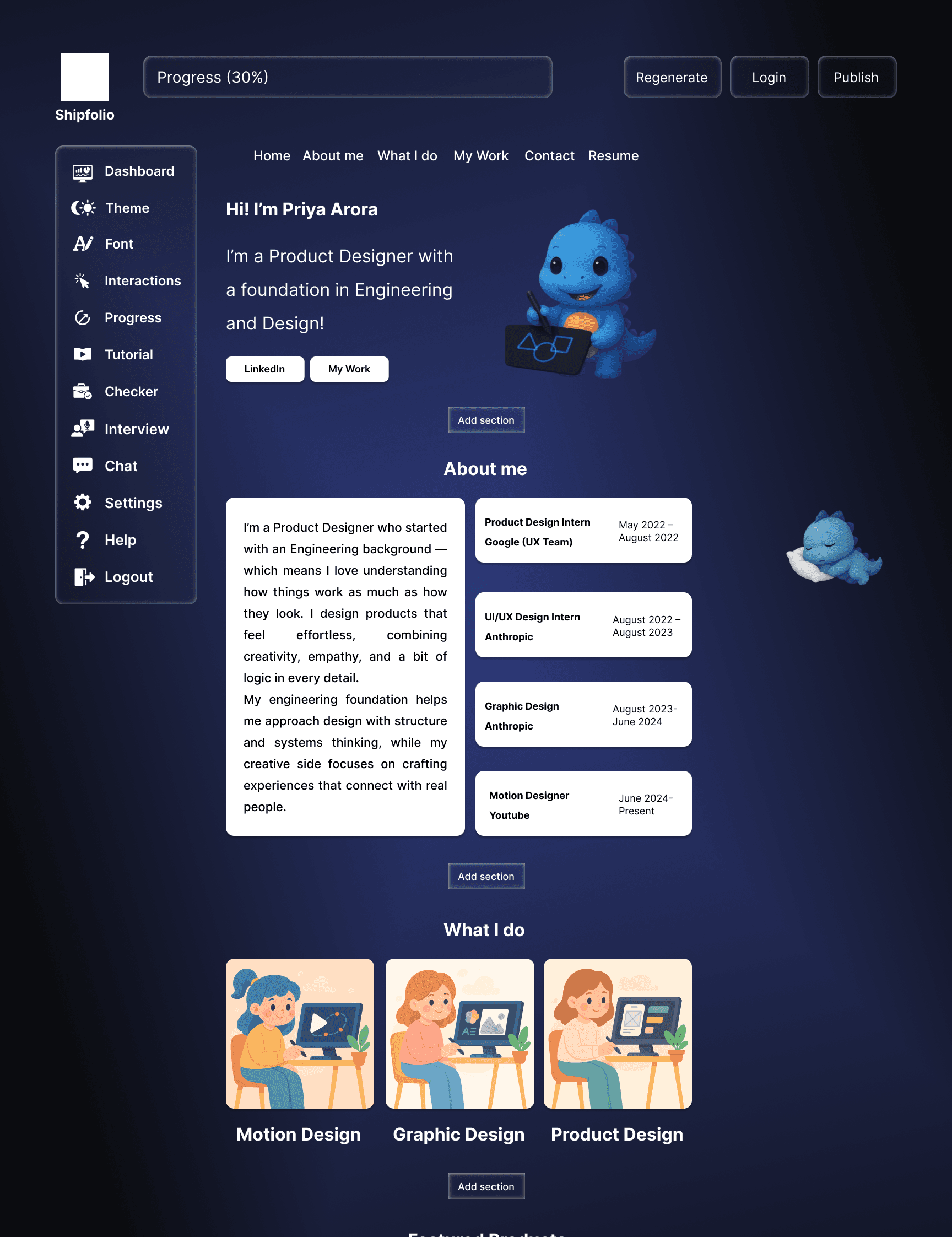
The sleeping mascot didn't communicate purpose or guidance.
Users didn't understand why the mascot was tied to every click.
Waking up the mascot added unnecessary steps before accessing tools.
The interaction slowed down quick editing and broke workflow.
Users expected direct tools, not a character triggered menu.
The mechanism felt playful but didn't support clarity.
What went missing
Initial Concept
The idea was that the user would land on a base editable portfolio where the mascot stayed asleep until an element was clicked, waking up to offer AI suggestions and editing options.
What went missing
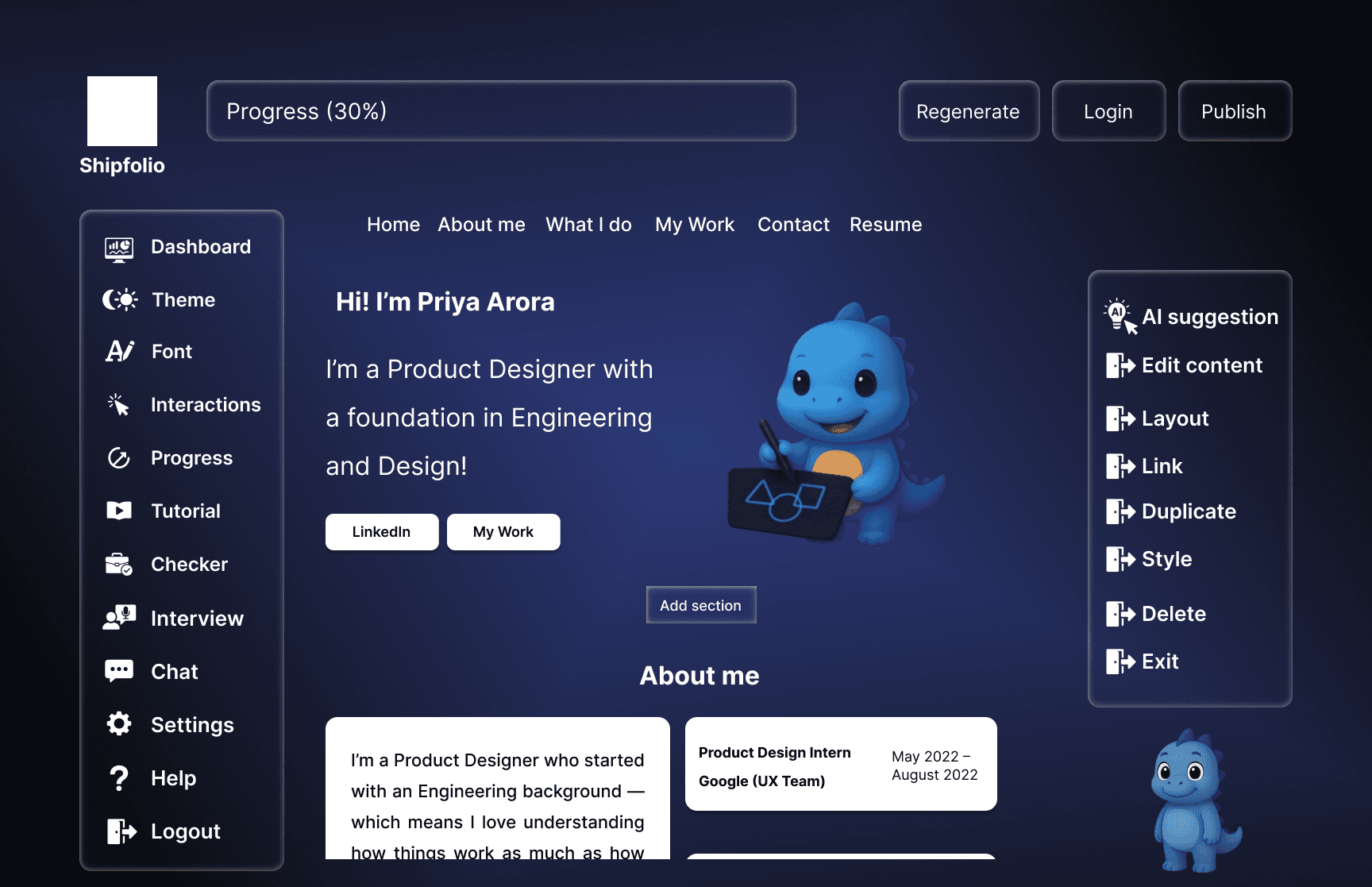
The long form caused cognitive overload.
The animation didn't add functional value.
Users wanted immediate progress, not passive visuals.
The mascot didn't offer clarity or guidance.
The progress was not motivating or actionable.
The interaction felt cute but lacked functional purpose
Initial Concept
Users fill a long form of questions.
The mascot animated beside them, sipping a drink as the progressed.
The drink emptied once the form was completed, Signalling progress.
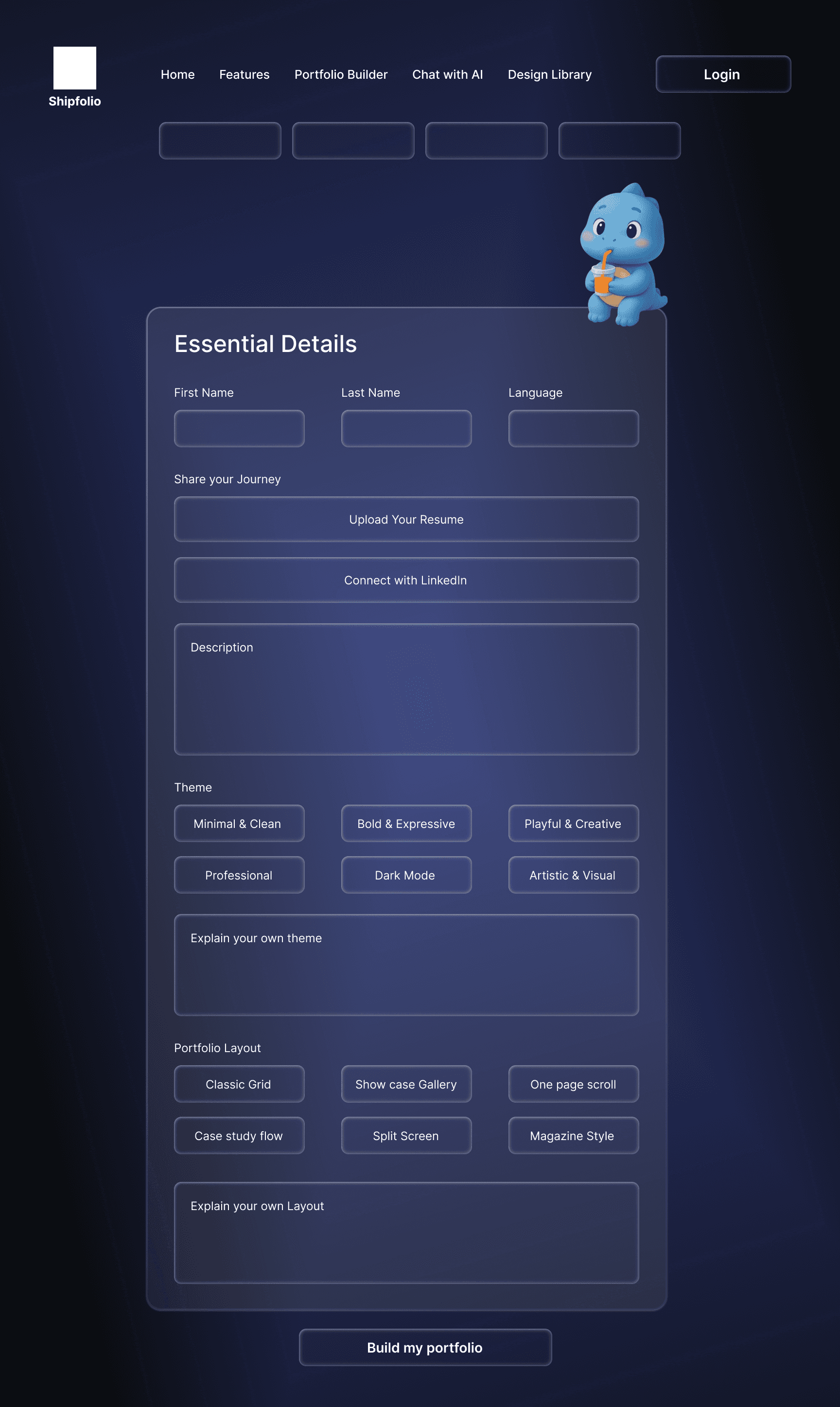
Why my initial concept did not work out.
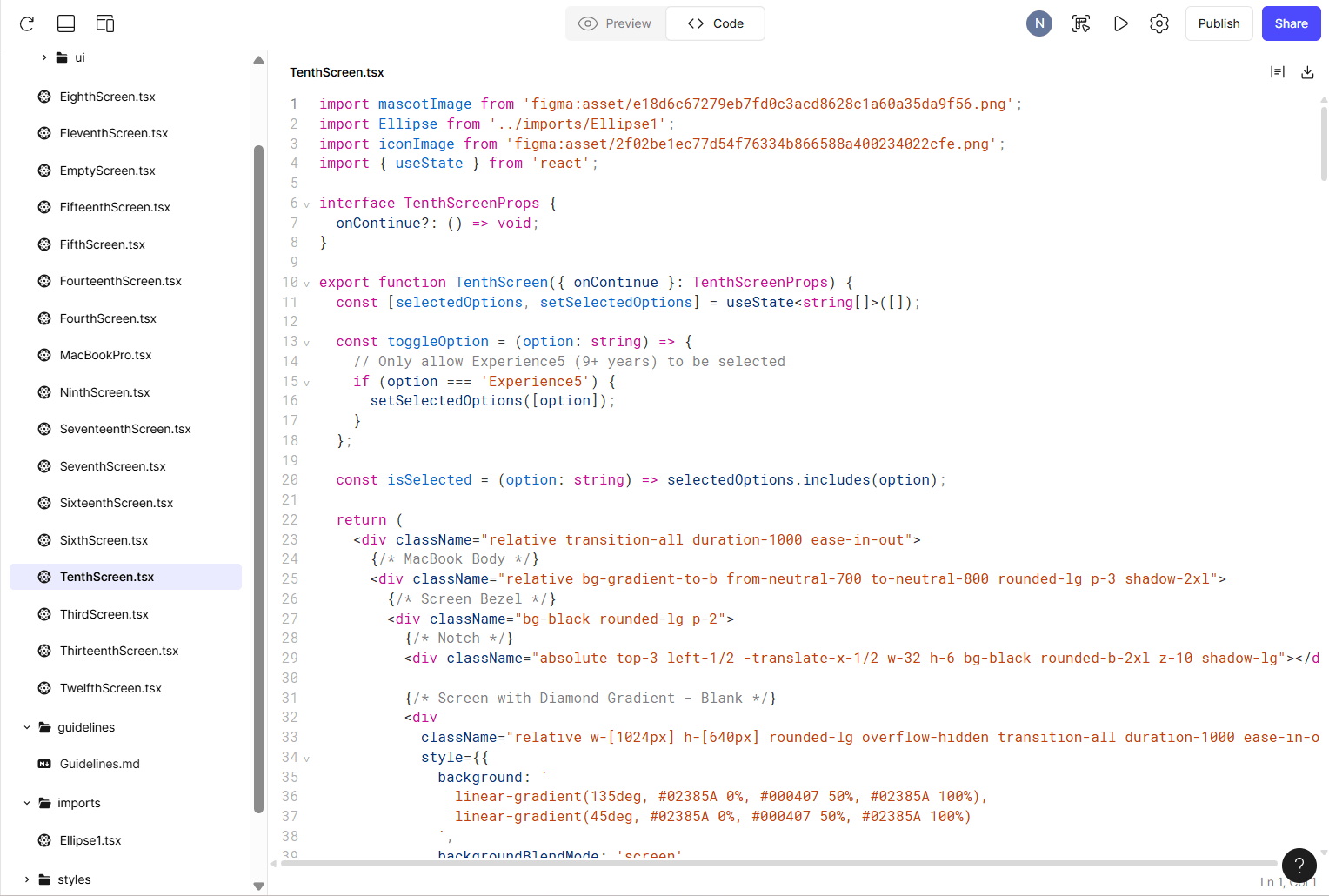
Building in Figma Make
Behind the Scenes
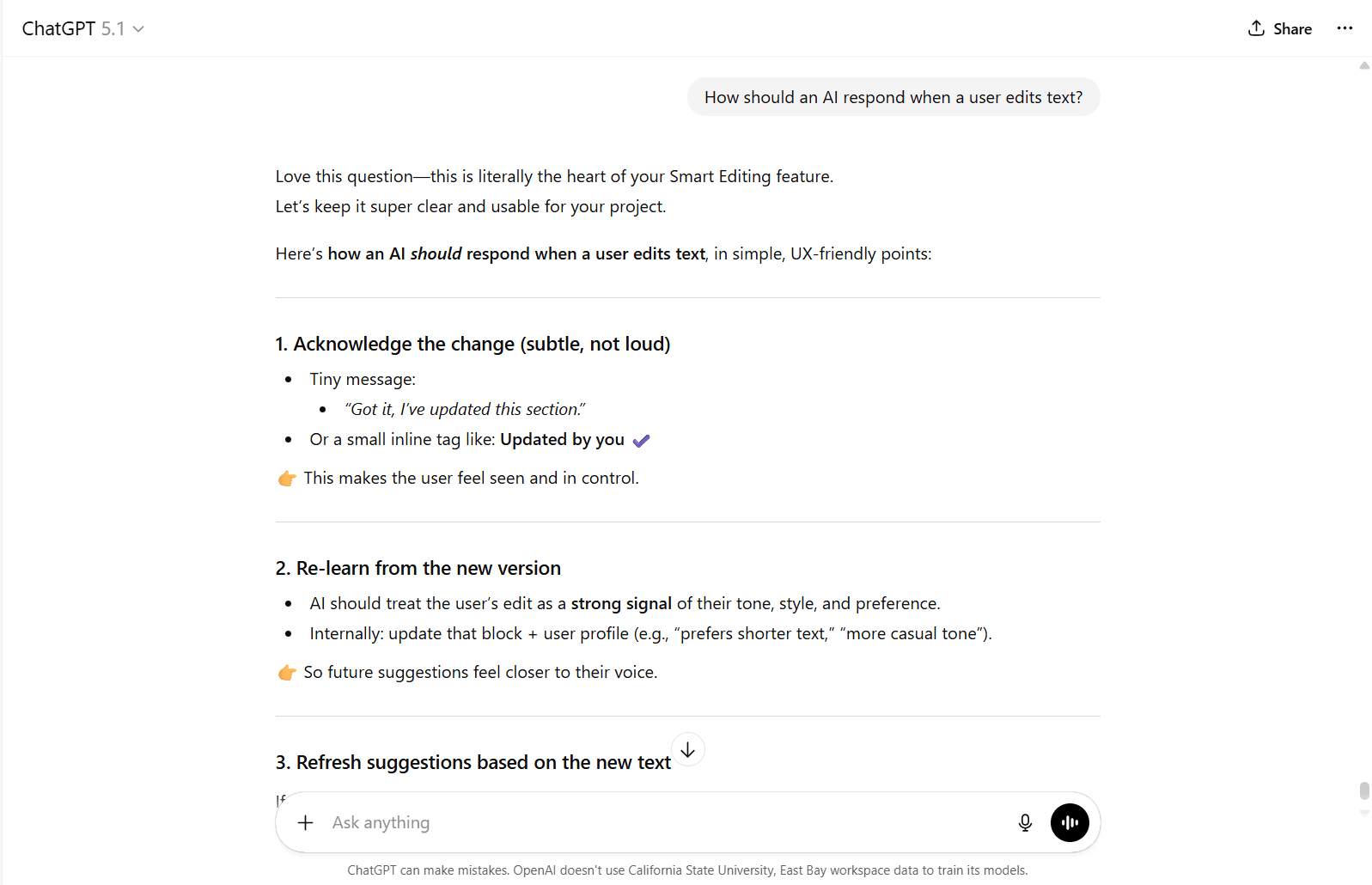
AI Logic Simulation :
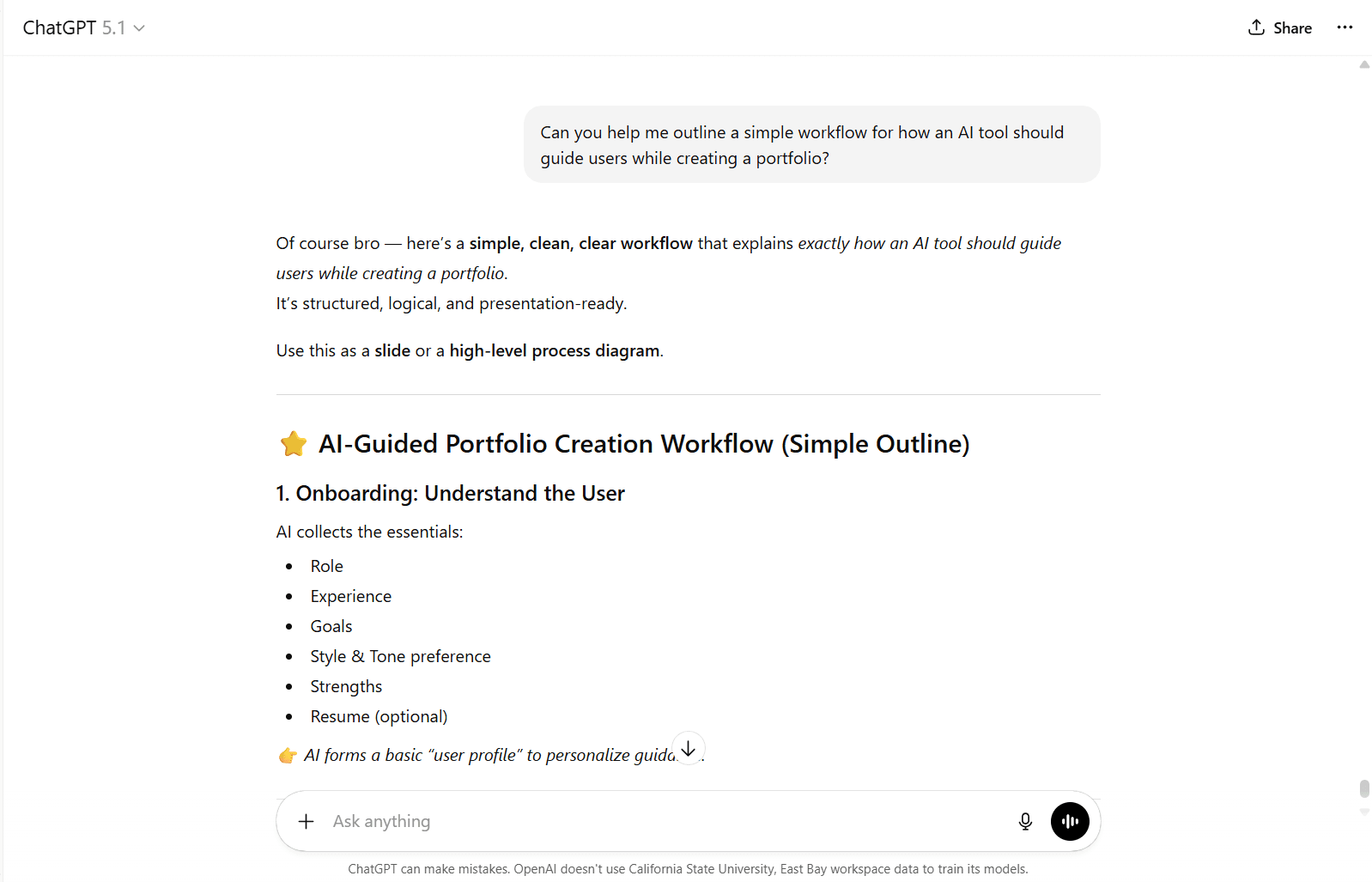
Simulated the product’s AI behaviour using Figma and Figma Make by creating simple input–output logic flows that demonstrate how the system guides users without a real AI backend.
Workflow Mapping
Sketched and refined the AI workflow in Fig Jam to define how user inputs are interpreted, processed, and translated into step-by-step guidance.
Logic & Messaging Design
Used ChatGPT to shape early logic, response patterns, and guidance tone, ensuring the system felt realistic and supportive.
Iterative Testing and Refine
Tested interactions screen-by-screen and refined logic blocks, messaging, and flow through rapid iterations to improve clarity and usability.
Breakdown of AI + Technology
Design System
Aa
Font Family: Inter
I chose Inter for its clarity, neutrality, and excellent on-screen readability. Designed specifically for digital interfaces, Inter supports long-form reading and small text sizes, making it ideal for a content-heavy portfolio tool. Its clean, modern tone helps keep the focus on the user’s work while reinforcing a calm and professional experience.
Prototype
2 Weeks
I began with low-fidelity wireframes to quickly explorelayouts and user flows, focusing on clarity and structure. These were then refined into high-fidelity interactive prototypes with consistent visual styling, detailed interactions, and a cohesive design system to reflect the final experience.
Test
3 Weeks
I began with low-fidelity wireframes to quickly explorelayouts and user flows, focusing on clarity and structure. These were then refined into high-fidelity interactive prototypes with consistent visual styling, detailed interactions, and a cohesive design system to reflect the final experience.
Implement
2 Weeks
I began with low-fidelity wireframes to quickly explore layouts and user flows, focusing on clarity and structure. These were then refined into high-fidelity interactive prototypes with consistent visual styling, detailed interactions, and a cohesive design system to reflect the final experience.

HMW Questions
User Stories
I want clear guidance on how to begin my portfolio so that I don't feel stuck at the start.
As someone who overthinks writing, I want prompts that help me focus so that I can move forward confidently.
I want the process broken into small steps so that writing feels less overwhelming.
I want help articulating my design decisions so that my work is easier to understand.
I want suggestions I can control and adapt so that my portfolio still sounds like me.
As I prepare my applications, I want reassurance that my portfolio is complete so that I feel confident sharing it.
As a user refining my portfolio, I want clarity on what’s missing so that I know what to improve.
I want a structured flow so that I can make progress even with limited time.
I want supportive guidance so that writing about my work feels less intimidating
I want my portfolio to feel consistent and cohesive so that my work is presented professionally.
I want help understanding what information matters most so that I don’t include unnecessary details.
Revisiting my portfolio after a break, I want clear next steps so that I can easily pick up where I left off.
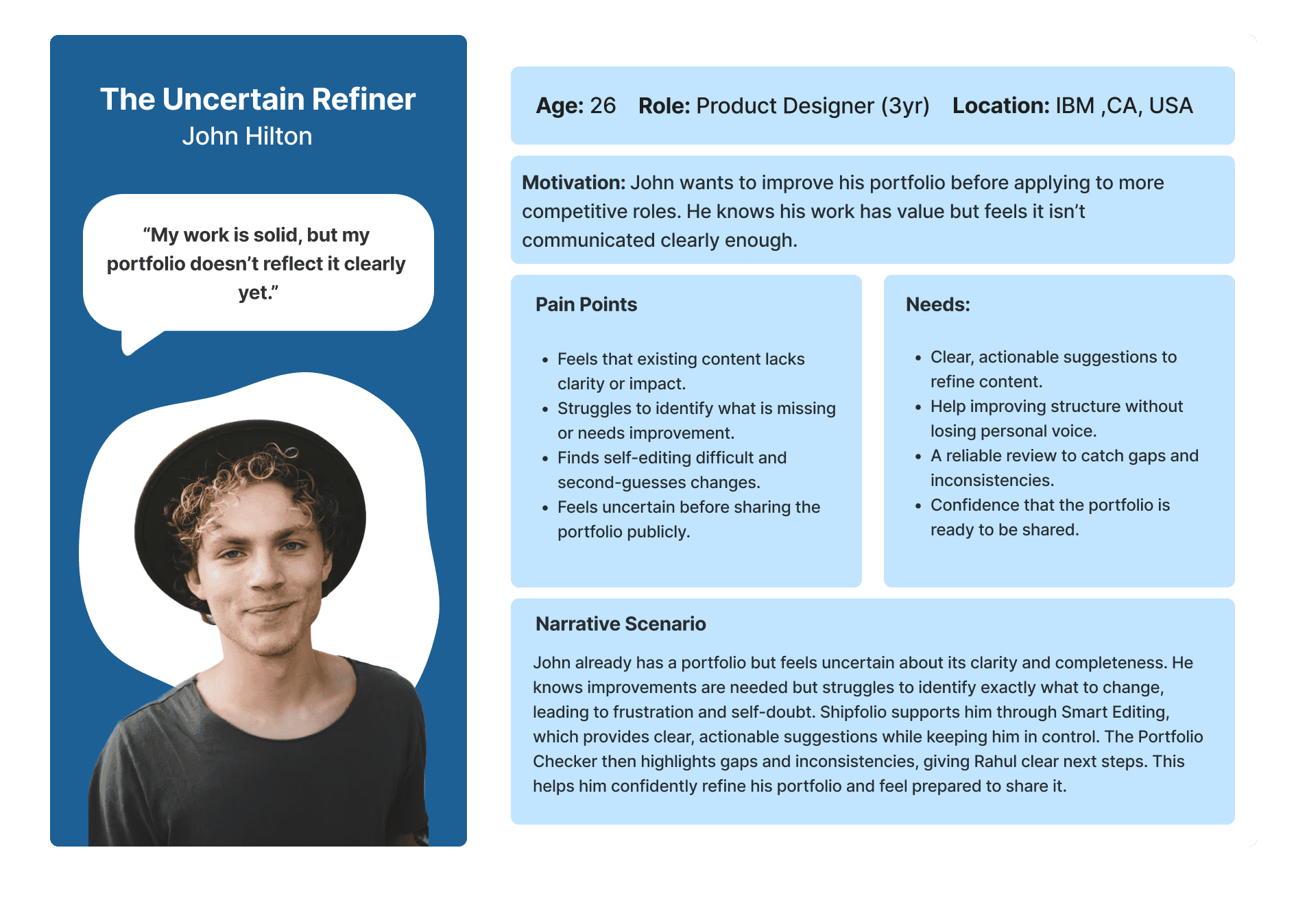
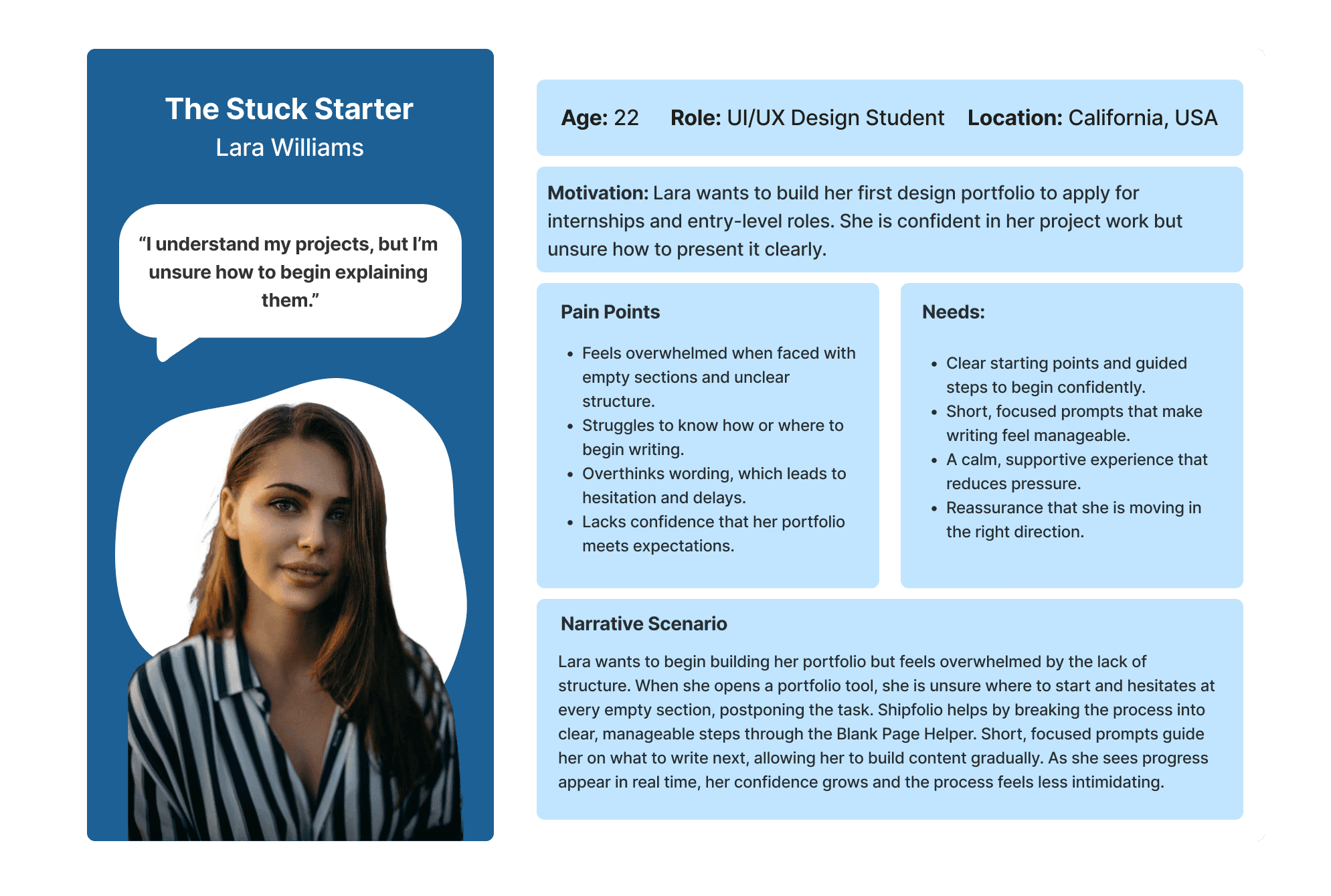
User Persona
Define
2 Weeks
Next step was to translate research insights into a clear problem definition by identifying key user needs, pain points, and constraints. This helped establish a strong design direction that addressed both workflow challenges and emotional barriers.
Ideate
1 Week
By analyzing existing portfolio tools, I identified gaps in guidance, structure, and confidence support. Using How Might We statements and rapid ideation, I explored solutions focused on step-by-step workflows, adaptive prompts, and supportive interactions.
75%
Users reported that getting started was the biggest barrier.
81%
Said supportive guidance helped reduce hesitation and move forward.
85%
Found writing about their own work intimidating, despite having strong projects.
Empathize
3 Weeks
Understanding the emotional and practical needs of designers.
Building a design portfolio is more than a technical task, it carries emotional pressure tied to jobs, internships, and self-confidence. Many designers feel overwhelmed, unsure how to present their work, and anxious about meeting hiring expectations. To understand these challenges, I conducted interviews, surveys, and observations with designers at different stages of portfolio creation. The research revealed common struggles around overthinking, lack of structure, and low confidence, highlighting the need for a portfolio-building experience that supports both clarity and emotional reassurance.
Diving into Research
Let's rationalise some of the decisions together !
How it all started
15 Weeks
Duration
Context
Individual Thesis Project
Shipfolio is an AI-powered portfolio-building platform designed to help designers present their work professionally and efficiently. As a design student building my own portfolio, I find the tools useful for generating content and layouts, but the overall experience often felt generic and overwhelming, especially when trying to craft strong project narratives. This revealed gaps in guidance, structure, and confidence in building throughout the portfolio creation process. Motivated to improve the experience, I focused on rethinking how Shipfolio could better support designers with clearer storytelling, more intentional AI assistance, and a more intuitive end-to-end portfolio flow.
Overview
Figma, Figma Make, Figjam, Miro, Chat GPT
Users struggle with portfolio creation due to unclear processes and cognitive overload, making it challenging to translate strong design work into clear, confident, and well-structured storytelling.
Many designers feel lost in the unstructured portfolio-building process, which inspired me to create clearer, more guided, and confidence-building workflows.
I designed Shipfolio to guide designers through portfolio creation with clear, structured workflows.
It reduces overwhelm and helps users confidently present their work.
End-To-End Product Thinking
Role
AI powered portfolio coach for designers stuck in procrastination.
Iteration
The Portfolio Checker helps designers review their portfolio by highlighting what’s working well and what needs improvement. It provides focused, section-specific feedback across clarity, structure, and consistency, helping users understand where to refine their work without feeling overwhelmed.
Each identified area includes an Improve button that takes users directly to the relevant section and offers guided support. This turns feedback into immediate action, reducing hesitation and helping designers make confident progress.
Feature 2
PORTFOLIO CHECKER
After a base portfolio is created, users can edit any section freely. When unsure about specific content, they can select it and ask Shipi for help. Shipi suggests an improved version, explains why it works, and allows users to apply the change instantly helping reduce doubt while keeping users in control of their voice.
During user testing, Smart Editing emerged as the strongest and most trusted feature, as users valued seeing improvements applied immediately with clear reasoning.
Feature 1
SMART EDITING
The sleeping mascot didn't communicate purpose or guidance.
Users didn't understand why the mascot was tied to every click.
Waking up the mascot added unnecessary steps before accessing tools.
The interaction slowed down quick editing and broke workflow.
Users expected direct tools, not a character triggered menu.
The mechanism felt playful but didn't support clarity.
What went missing
Initial Concept
The idea was that the user would land on a base editable portfolio where the mascot stayed asleep until an element was clicked, waking up to offer AI suggestions and editing options.
What went missing
The long form caused cognitive overload.
The animation didn't add functional value.
Users wanted immediate progress, not passive visuals.
The mascot didn't offer clarity or guidance.
The progress was not motivating or actionable.
The interaction felt cute but lacked functional purpose
Initial Concept
Users fill a long form of questions.
The mascot animated beside them, sipping a drink as the progressed.
The drink emptied once the form was completed, Signalling progress.
Why my initial concept did not work out.
Building in Figma Make
Behind the Scenes
AI Logic Simulation :
Simulated the product’s AI behaviour using Figma and Figma Make by creating simple input–output logic flows that demonstrate how the system guides users without a real AI backend.
Workflow Mapping
Sketched and refined the AI workflow in Fig Jam to define how user inputs are interpreted, processed, and translated into step-by-step guidance.
Logic & Messaging Design
Used ChatGPT to shape early logic, response patterns, and guidance tone, ensuring the system felt realistic and supportive.
Iterative Testing and Refine
Tested interactions screen-by-screen and refined logic blocks, messaging, and flow through rapid iterations to improve clarity and usability.
Breakdown of AI + Technology
Design System
Aa
Font Family: Inter
I chose Inter for its clarity, neutrality, and excellent on-screen readability. Designed specifically for digital interfaces, Inter supports long-form reading and small text sizes, making it ideal for a content-heavy portfolio tool. Its clean, modern tone helps keep the focus on the user’s work while reinforcing a calm and professional experience.
Prototype
2 Weeks
I began with low-fidelity wireframes to quickly explorelayouts and user flows, focusing on clarity and structure. These were then refined into high-fidelity interactive prototypes with consistent visual styling, detailed interactions, and a cohesive design system to reflect the final experience.
Test
3 Weeks
I began with low-fidelity wireframes to quickly explorelayouts and user flows, focusing on clarity and structure. These were then refined into high-fidelity interactive prototypes with consistent visual styling, detailed interactions, and a cohesive design system to reflect the final experience.
Implement
2 Weeks
I began with low-fidelity wireframes to quickly explore layouts and user flows, focusing on clarity and structure. These were then refined into high-fidelity interactive prototypes with consistent visual styling, detailed interactions, and a cohesive design system to reflect the final experience.
HMW Questions
User Stories
I want clear guidance on how to begin my portfolio so that I don't feel stuck at the start.
As someone who overthinks writing, I want prompts that help me focus so that I can move forward confidently.
I want the process broken into small steps so that writing feels less overwhelming.
I want help articulating my design decisions so that my work is easier to understand.
I want suggestions I can control and adapt so that my portfolio still sounds like me.
As I prepare my applications, I want reassurance that my portfolio is complete so that I feel confident sharing it.
As a user refining my portfolio, I want clarity on what’s missing so that I know what to improve.
I want a structured flow so that I can make progress even with limited time.
I want supportive guidance so that writing about my work feels less intimidating
I want my portfolio to feel consistent and cohesive so that my work is presented professionally.
I want help understanding what information matters most so that I don’t include unnecessary details.
Revisiting my portfolio after a break, I want clear next steps so that I can easily pick up where I left off.
User Persona
Define
2 Weeks
Next step was to translate research insights into a clear problem definition by identifying key user needs, pain points, and constraints. This helped establish a strong design direction that addressed both workflow challenges and emotional barriers.
Ideate
1 Week
By analyzing existing portfolio tools, I identified gaps in guidance, structure, and confidence support. Using How Might We statements and rapid ideation, I explored solutions focused on step-by-step workflows, adaptive prompts, and supportive interactions.
75%
Users reported that getting started was the biggest barrier.
81%
Said supportive guidance helped reduce hesitation and move forward.
85%
Found writing about their own work intimidating, despite having strong projects.
Empathize
3 Weeks
Understanding the emotional and practical needs of designers.
Building a design portfolio is more than a technical task, it carries emotional pressure tied to jobs, internships, and self-confidence. Many designers feel overwhelmed, unsure how to present their work, and anxious about meeting hiring expectations. To understand these challenges, I conducted interviews, surveys, and observations with designers at different stages of portfolio creation. The research revealed common struggles around overthinking, lack of structure, and low confidence, highlighting the need for a portfolio-building experience that supports both clarity and emotional reassurance.
Diving into Research
Let's rationalise some of the decisions together !
How it all started
15 Weeks
Duration
Context
Individual Thesis Project
Shipfolio is an AI-powered portfolio-building platform designed to help designers present their work professionally and efficiently. As a design student building my own portfolio, I find the tools useful for generating content and layouts, but the overall experience often felt generic and overwhelming, especially when trying to craft strong project narratives. This revealed gaps in guidance, structure, and confidence in building throughout the portfolio creation process. Motivated to improve the experience, I focused on rethinking how Shipfolio could better support designers with clearer storytelling, more intentional AI assistance, and a more intuitive end-to-end portfolio flow.
Overview
Figma, Figma Make, Figjam, Miro, Chat GPT
Users struggle with portfolio creation due to unclear processes and cognitive overload, making it challenging to translate strong design work into clear, confident, and well-structured storytelling.
Many designers feel lost in the unstructured portfolio-building process, which inspired me to create clearer, more guided, and confidence-building workflows.
I designed Shipfolio to guide designers through portfolio creation with clear, structured workflows.
It reduces overwhelm and helps users confidently present their work.
End-To-End Product Thinking
Role
AI powered portfolio coach for designers stuck in procrastination.
Iteration
The Portfolio Checker helps designers review their portfolio by highlighting what’s working well and what needs improvement. It provides focused, section-specific feedback across clarity, structure, and consistency, helping users understand where to refine their work without feeling overwhelmed.
Each identified area includes an Improve button that takes users directly to the relevant section and offers guided support. This turns feedback into immediate action, reducing hesitation and helping designers make confident progress.
Feature 2
PORTFOLIO CHECKER